
Run your band's page
Find your way around Manage: First steps, Try next, insights, and the people who run the page with you.
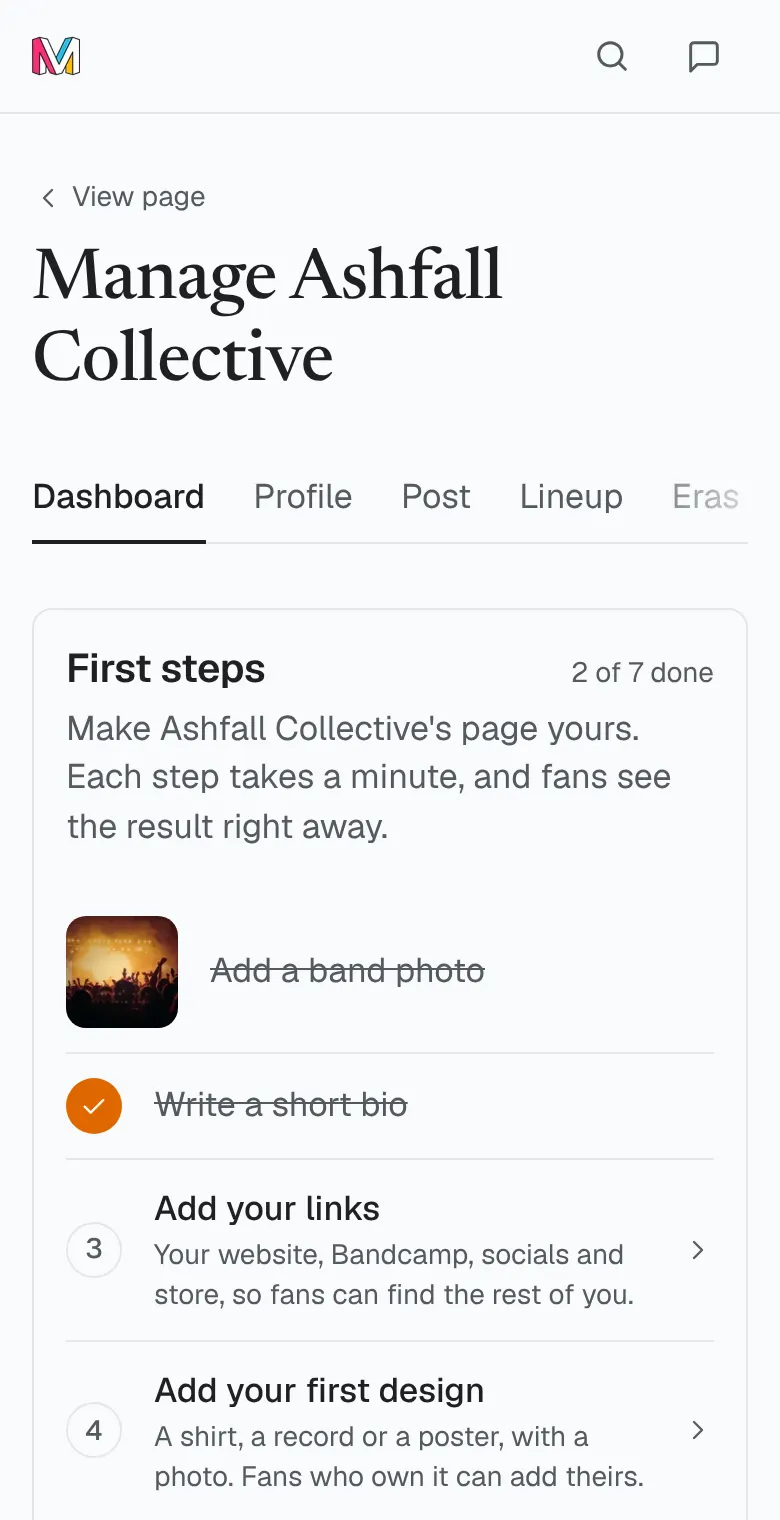
Once your claim is approved, Manage sits beside Follow on your band's page. It opens your band's dashboard, and every tool for the page is a tab from there.
How to do it
- Open your band's page and tap Manage. The dashboard opens first. View page takes you back to the page.
- Work through First steps at the top: a band photo, a short bio, your links, your first design, a post to your followers and a bandmate. Each step opens the place it's done, and reads Done once it is.
- Then look at Try next: band tools you haven't used yet, like a giveaway, the press kit or your link for bios. Tap one to open it. It reads Tried after that.
- Find everything else in the tabs, grouped as Page, Fans and Business. On a phone, the dashboard lists them under All sections.
- Open Insights to see your band against its own past: your merch, your fans and how each month moved. Turn on Email me these every week for five numbers each Monday, or pick a month under Download your numbers and tap Download CSV.
- Open People to add a manager. Type their username under Add a manager and tap Add. Not on MerchVice yet? Type their email under Invite a bandmate by email and tap Send invite. The invite works for 14 days.
Good to know
- A page has one owner and up to three managers. Only the owner adds managers and sends invites, and invites still waiting count toward the three. A manager can step away with Leave this page; the owner asks MerchVice to make someone else the owner first.
- Bandmates can help without being managers. Under Lineup, type their username under MerchVice profile and tap Ask to confirm. Once they accept, they're crew: they can post updates, add photos and arrange the merch shelf, but never change settings, managers, the store or claims. Turn anyone's posting off under Crew, and remove any crew post from the band's page.
- Some sections, such as Shows, Releases and Media, appear once they're open to your band.
- Under Friend of the band, tap Make a friend beside a fan with your merch, then Give the pin. They get Friend of your band on their profile. One per fan, and it's never for sale.
- Labels and artists can ask to list your band on their roster or credit your designs. Their asks wait on the dashboard under Labels and artists, and nothing shows until the owner taps Confirm. Run a label, or drew the designs yourself? Where label and artist pages are open, they have their own Claim this page, and a person checks it the same way.
Was this helpful?
We count the answer for this article and keep nothing about you.
Still stuck?
Write to us and a real person reads it.